
HEx (cam)2.2 - App Store
You'll be able to see results in few seconds.
Publisher Description
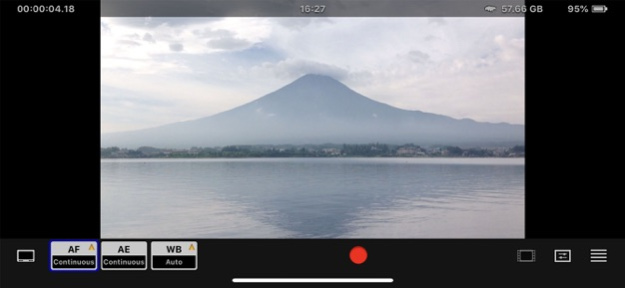
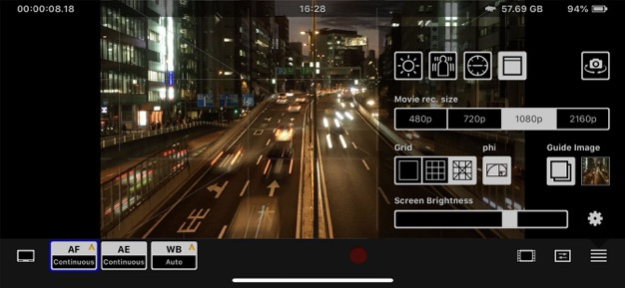
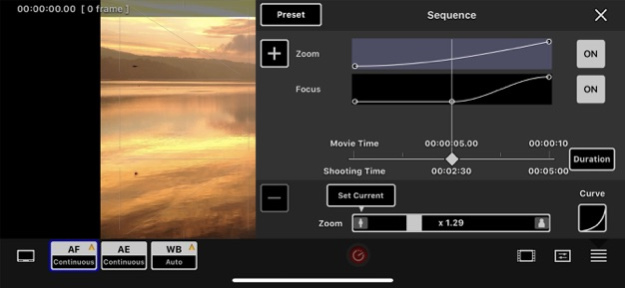
-- HEx (cam) -- This application has many highly sophisticated functions for recording moving image.
HEx (cam) is a video recording application that can transform your iPhone / iPod Touch into a highly sophisticated camera.
It allows you to capture moving image in three modes that fully mirror a professional image recording workflow - standard recording mode, time lapse mode and stop motion mode.
- Basic specifications
-- Three recording modes ( Normal / Time Lapse / Stop Motion )
-- Focus (AF), Exposure (AE) and White Balance (WB) can be individually set and lock
-- Manual AF / AE / WB
-- Sequence ( Time Lapse / Stop Motion )
-- Frame lines to be used for framing (2 modes + adjustable line width)
-- Screen Brightness can be adjusted for shooting in darkness and to conserve battery life
-- Display current time, remaining memory and remaining battery life
-- The brightness of the Flash light can be adjusted (*1)
-- 1:1 pixel mapping preview (*2)
-- Display setting parameter.
-- Video stabilizer (Standard mode / Cinematic mode)
-- Monitor overlay tools ( Focus / Zoom )
-- Export movie to camera roll
-- File sharing in iTunes.
- Normal recording specifications
-- Video format : H.264
-- Video resolution : 480p / 720p / 1080p (*3) / 2160p (*3)
-- Video frame rate : 240 (*6) , 120 (*6), 60 (*6), 30, 24, 15, 12fps
-- Video bitrate : iOS default quality.
-- Audio format : AAC
-- Audio bitrate : 44 kHz
- Time Lapse specifications
-- Video format : H.264
-- Video Resolution : 480p ( 720p / 1080p(*3) / 2160p(*3) is available in the full version )
-- Video frame rate : 60, 30, 24, 15, 12 fps
-- Video bitrate : 10 Mbps / 25 Mbps
-- Highly sensitive mode (Auto gain up in darkness)
-- Shooting time simulation.
- Stop Motion specifications
-- Video format : H.264
-- Video Resolution : 480p ( 720p / 1080p(*3) / 2160p(*3) is available in the full version )
-- Video frame rate : 60, 30, 24, 15, 12 fps
-- Video bitrate : 10 Mbps / 25 Mbps
-- Onion skinning (previous frame overlay, and adjustable opacity)
- Movie list / Player specifications
-- User rating and file lock
-- Loop playback mode
-- 1:1 pixel mapping preview (*2)
-- Playback movie speed rate (-2 , -1.5 , -1 , -0.5 , +0.5 , +1.0 , +1.5 , +2.0)
- Full version specifications (Add on)
-- Video format : H.264 / Photo-JPEG
-- Video bitrate : 10 Mbps / 25 Mbps / 50 Mbps / 70 Mbps (*4) / 150 Mbps (*4) / 200 Mbps (*4)
-- Audio format : AAC / Linear PCM (*5)
-- Audio bitrate : 44 kHz / 48 kHz (*5)
-- Audio level meter (*5)
-- In Time Lapse and Stop Motion recording modes, video resolution can be 720p / 1080p (*3) / 2160p(*3)
-- 2 axis spirit level can be calibrated and the opacity adjusted
-- Golden ratio frame line
-- Display Guide image (previous video image can be overlaid and opacity adjusted) (*4)
-- Focus Peaking (showing red and green flashing dots where the suspected focus is) (*4)
-- Zebra (showing zebra stripes where the image is overexposed) (*4)
-- False Color (different colors indicate different exposure levels) (*4)
-- Exposure (showing exposure levels) (*4)
-- File sharing via Wi-Fi (recorded video files can be downloaded via Wi-Fi using browser)
(*1) Models equipped with a Flash light.
(*2) In order for this function to work, the camera resolution must be lower than the screen resolution.
(*3) Maximum resolution depends on model of iPhone used.
(*4) Only works in Normal recording custom settings, Time Lapse, Stop Motion.
(*5) Only 'Normal' Recording mode and 'Custom' setting.
(*6) Maximum frame rate depends on model of iPhone used.
Dec 8, 2019
Version 2.2
Fixed bugs.
About HEx (cam)
The company that develops HEx (cam) is mash studio. The latest version released by its developer is 2.2.
To install HEx (cam) on your iOS device, just click the green Continue To App button above to start the installation process. The app is listed on our website since 2019-12-08 and was downloaded 0 times. We have already checked if the download link is safe, however for your own protection we recommend that you scan the downloaded app with your antivirus. Your antivirus may detect the HEx (cam) as malware if the download link is broken.
How to install HEx (cam) on your iOS device:
- Click on the Continue To App button on our website. This will redirect you to the App Store.
- Once the HEx (cam) is shown in the iTunes listing of your iOS device, you can start its download and installation. Tap on the GET button to the right of the app to start downloading it.
- If you are not logged-in the iOS appstore app, you'll be prompted for your your Apple ID and/or password.
- After HEx (cam) is downloaded, you'll see an INSTALL button to the right. Tap on it to start the actual installation of the iOS app.
- Once installation is finished you can tap on the OPEN button to start it. Its icon will also be added to your device home screen.
Program Details
System requirements
Download information
Pricing
Version History
version 2.2
posted on 2019-12-08
Dec 8, 2019
Version 2.2
Fixed bugs.
Disclaimer
Official App Store Link
We do not host HEx (cam) on our servers. We did not scan it for viruses, adware, spyware or other type of malware. This app is hosted by Apple and passed their terms and conditions to be listed there. We recommend caution when installing it.
The App Store link for HEx (cam) is provided to you by apps112.com without any warranties, representations or guarantees of any kind, so access it at your own risk.
If you have questions regarding this particular app contact the publisher directly. For questions about the functionalities of apps112.com contact us.
